File Manager
PROBrowse, upload and download files on your EP device
Overview
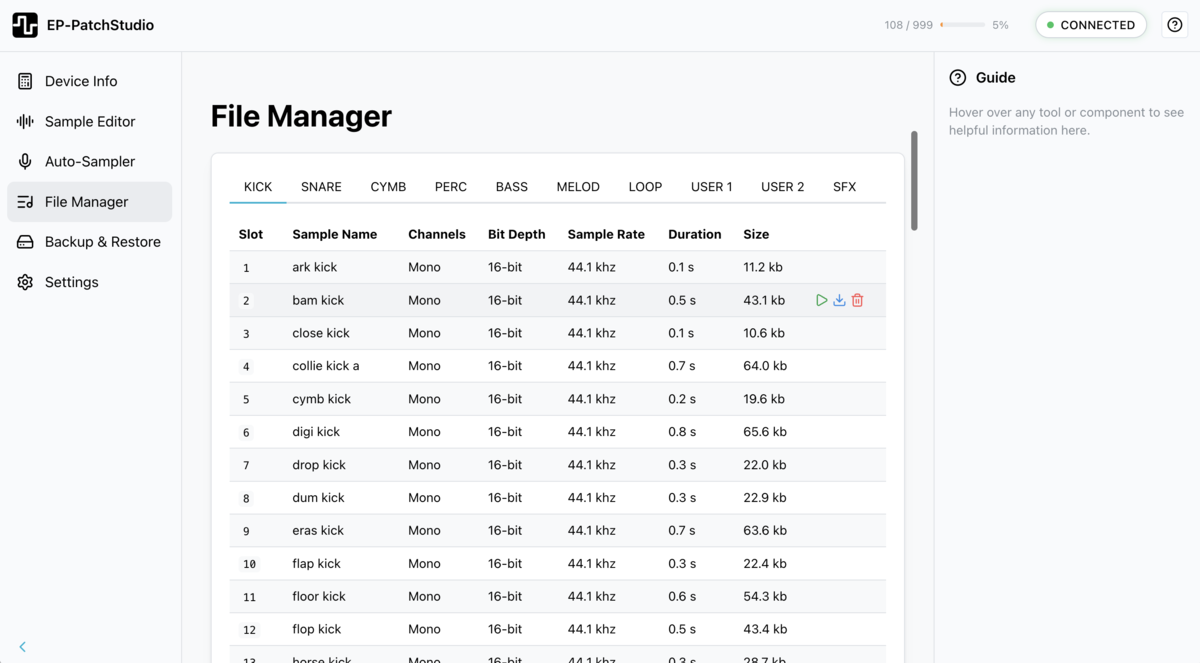
The File Manager does what the official browser tool does but faster and with batch operations. Browse your device's sample slots, upload new samples, download existing ones. File listing loads in seconds, not minutes.
The app caches samples in the background after your device connects. This means backups are nearly instant once the cache is populated. It's a proper installed app, not a browser tab, so it works offline too.
File Categories
Samples are organised into categories based on the EP device type:
EP-40 Riddim
- Kicks: slots 1-99
- Snares: slots 100-199
- Hi-hats: slots 200-299
- Percussion: slots 300-399
- Bass: slots 400-499
- Melodic: slots 500-599
- Chords: slots 600-699
- Vox / FX: slots 700-799
- Loops: slots 800-899
EP-133 K.O. II & EP-1320 Medieval
- Categories vary by device model
- File Manager automatically adapts to show the correct categories
Browsing Device Files
The File Manager displays all samples in a sortable table:
- Slot: Sample slot number (1-999 on EP-40)
- Sample Name: The filename of the sample
- Type: Sample type badge (Oneshot, Key, Legato, Loop or Multi)
- Channels: Mono or Stereo
- Bit Depth: Audio bit depth (usually 16-bit)
- Sample Rate: the sample's audio sample rate
- Duration: Length of the sample in seconds
- Size: File size in KB or MB
Sorting
Click any column header to sort by that property. Click again to reverse the order, and a third time to return to the default sort. Use the category tabs at the top to filter by sample type.
Search & Filtering
Type in the search bar to filter samples by name. Matching text is highlighted in the results. Filters persist when switching between category tabs. Each tab tooltip shows the number of filled slots in that category.
Auto-preview
Selecting a sample automatically plays a preview. Use the arrow keys to move through samples and hear each one as you go, handy for quickly auditioning what's on the device.
Tabs
The File Manager supports multiple tabs so you can have several views open at once. Double-click a tab title to rename it, useful for labelling what you're working on (e.g. "Kicks to replace", "Live set samples"). Use the reset button to revert a renamed tab back to its default name.
Context Menu
Right-click any slot to access quick actions: Play, Rename, Download, Delete and Upload here.
Keyboard Shortcuts
- Delete / Backspace: Delete selected sample(s)
- Enter / Space: Play selected sample
- Arrow keys: Navigate between samples with auto-preview
Uploading Samples to Device
Adding new samples to your device:
- Navigate to the target category : Click the tab for the category you want (Kicks, Snares, etc.)
- Find an empty slot: Look for slots marked as empty or containing samples you want to replace
- Click "Upload" on that slot: An upload button appears for each slot
- Select your audio file: Choose a WAV, MP3 or AIFF file
- Wait for transfer: The file will be uploaded via USB MIDI (this may take a moment for larger files)
- Verify the upload: The table will update to show the new sample details
File Format Conversion
EP-PatchStudio automatically converts uploaded files to a device-compatible 16-bit WAV on import, so you can drop in a WAV, AIFF or MP3 and it's handled for you.
Downloading Samples from Device
Backing up samples from your device:
- Navigate to the category: Select the category containing the sample you want
- Click "Download" on the slot : A download button appears for each filled slot
- Choose save location: Select where to save the file on your computer
- Wait for download: The sample will be transferred via USB MIDI
You can also download multiple samples by selecting them and using the batch download feature.
Batch Rename
Select multiple samples and rename them in bulk using pattern tokens:
- {n}: sequential number (1, 2, 3…)
- {nn}: zero-padded number (01, 02, 03…)
- {name}: original sample name
- {slot}: slot number
ZIP Export
Select multiple samples and export them as a single ZIP archive. Handy for backing up a set of samples or sharing them with others without doing a full device backup.
Trim to Fit
Samples exceeding the 20-second duration limit can be trimmed to fit directly from the File Manager. Click "Trim to fit" to automatically truncate the sample to the maximum allowed length.
Recycle Bin
Deleted samples are moved to the Recycle Bin rather than being permanently removed immediately. You can restore individual samples or use multi-select to bulk restore.
The Recycle Bin gives you a safety net when tidying up your device, so accidentally deleted samples can be recovered.
Undo
The File Manager supports multi-step undo. If you rename, move or delete something by mistake, undo it immediately.
Deleting Samples
Removing samples to free up space:
- Locate the sample: Find the slot you want to clear
- Click "Delete": Confirm the deletion when prompted
- Slot cleared: The slot is now empty and available for new samples
Warning: Deletion is Permanent
Deleting a sample from your device cannot be undone unless you have a backup. Always download important samples before deleting them.
Sync Status
The File Manager shows a "SYNCING" indicator when communicating with your device:
- Initial sync: When you first connect or navigate to File Manager, all samples are loaded from the device
- Upload sync: When uploading, the file is transferred and verified
- Download sync: When downloading, the file is read from device memory
- Delete sync: When deleting, the slot is cleared and updated
Wait for syncing to complete before disconnecting your device or navigating away from File Manager.
Tips & Best Practices
- Organise by category: Use the category tabs to keep your samples organised
- Download before deleting: Always back up samples you might want later
- Check storage indicator: The top bar shows total samples and storage percentage
- Use descriptive names: Rename files on your computer before uploading for easier identification
- Monitor transfer times: Larger files take longer via USB MIDI, be patient
- Keep device connected: Don't disconnect during file operations
- Create backups: Use the Backup & Restore feature for full device backups
Troubleshooting
Upload fails or hangs
- Check USB connection is stable
- Try a smaller file size
- Ensure device has enough free storage
- Restart the app and try again
File Manager shows empty slots but device has samples
- Click "Refresh" to re-sync with device
- Disconnect and reconnect the device
- Restart EP-PatchStudio
Uploaded file doesn't play correctly on device
- Verify the source file plays correctly on your computer
- Check the file isn't corrupted
- Try converting to WAV before uploading
- Ensure sample rate is appropriate (44.1 kHz recommended)
Faster than the browser tool
Batch operations, offline access, desktop convenience. Free trial available.