Grown-up software for Teenage Engineering devices

Stop Managing Samples.
Start Making Music.

Everything TE's tool does, plus everything it doesn't. Multisamples in 2 minutes instead of 30.

14-day Pro trial included · No signup required

Mac, Windows, Linux, Android & iOS · Works with EP-40, EP-133 & EP-1320
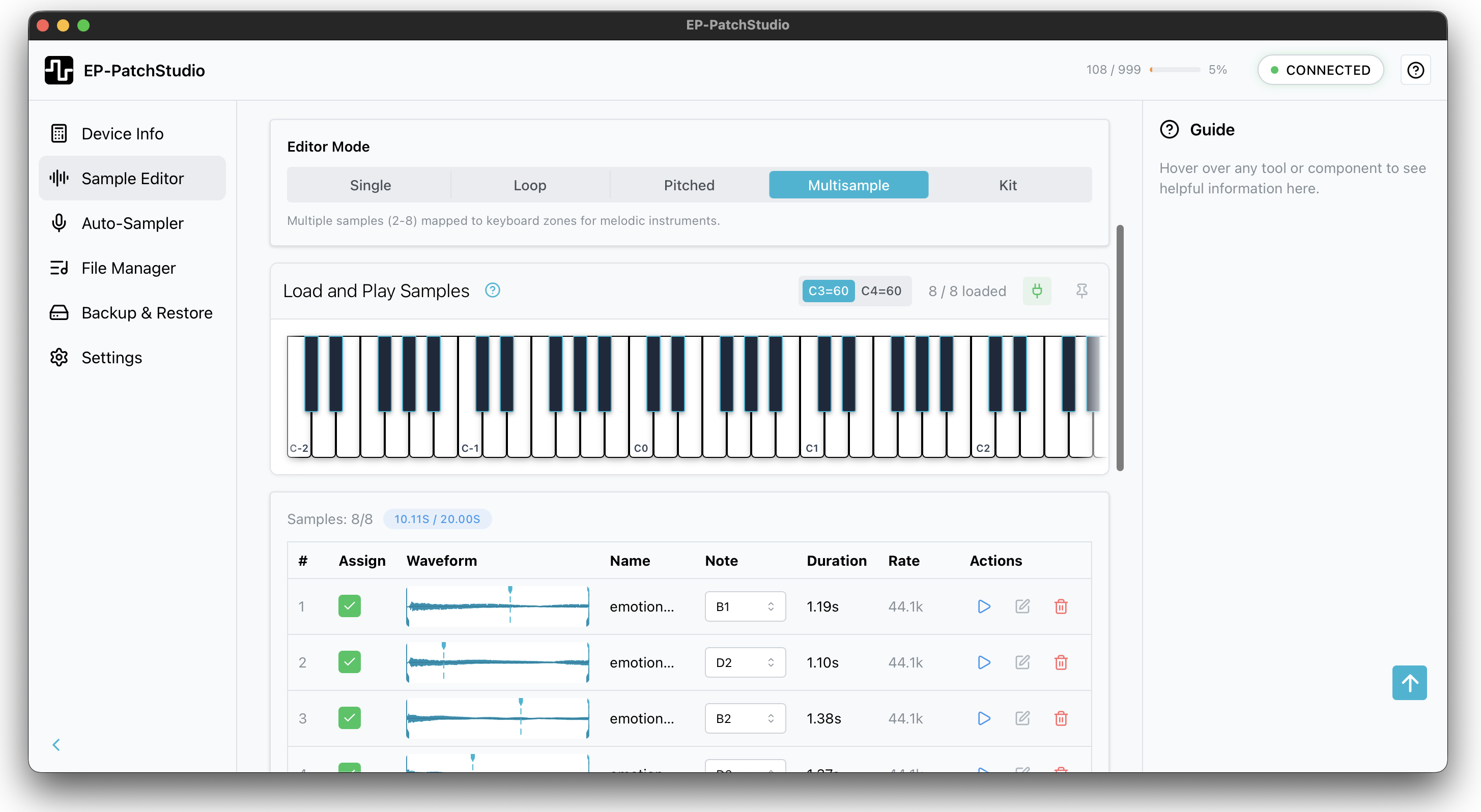
Multisample editor interface showing piano keyboard, sample zones and note mapping

Trusted by 1,000+ EP owners

“Doing tiny edits on device is not easy, Ableton is annoying, the EP web tool is basic... this tool is like all three of those had a baby. I am glad I bought it already.”

arruzza · Discord

“You've actually made me appreciate how good the EP devices are. The ability to save and load a single project and the file manager showing samples used in projects. Brilliant.”

Beta Tester · EP-40 Owner

“Incredibly easy to multisample from VSTs including Kontakt in Logic. Getting Mellotron patches out of Kontakt into the EP. Kind of cool.”

Elektronauts User · Producer, Logic User

“Super easy to convert to lower sample rates. Saves space on the device and adds a bit of grit. 22k samples sound really good on the EP without being too dirty.”

DimensionsTomorrow · EP-40 Owner

The old way vs. the new way

Without EP-PatchStudio

Creating a multisample:

  1. Record each note in your DAW
  2. Export as WAV
  3. Import to an EP multisample editor
  4. Trim silence from each file
  5. Normalise levels
  6. Map zones, edit params
  7. Export samples
  8. Upload to device via TE's EP Sample Tool

Time: 25-30 minutes

Managing your device with TE's EP Sample Tool:

  • Browser-based, can't work offline
  • No multisample editor
  • No audio editing tools
  • Slow backups
With EP-PatchStudio

Creating a multisample:

  1. Drop samples in (zones auto-map from metadata/filenames)
  2. Click "Send to Device"

Done

Time: 2 minutes

Or use the Auto-Sampler:

  1. Connect synth via MIDI
  2. Set note range
  3. Click Record (zones auto-map)
  4. Click "Send to Device"

Done

Time: 5 minutes

Managing your device:

  • Native app, works offline
  • Batch upload/download/delete
  • Fast transfers
  • One-click backup & restore
  • Browse and inspect all 9 projects
  • Export patterns as MIDI

Drop samples in, tweak if you want, send to device. Average time to create a multisample: 2-5 minutes

Try It Free

What it fixes

Real complaints from EP owners, and what we did about them

There's no official way to build EP-40 multisamples
“At the moment there's no official way to add your own... but fingers crossed, maybe later?”

This is why the app exists. Build EP-40 multisamples in the Sample Editor, or let the Auto-Sampler capture a synth across the keyboard hands-off (Auto-Sampler is Pro, desktop only).

Your own instruments on the EP-40, without cracking anything.

Sample prep is a DIY Audacity chore

The accepted community fix, straight from the Gearspace EP-133 thread, is building your own Audacity macros to batch-prep samples before they go anywhere near the device.

The Batch Processor does the lot in one pass: normalise, convert format and sample rate, trim silence, mono, rename by pattern. Hundreds of files at a time, on the free tier.

The Audacity macro you never had to build.

Backup is all-or-nothing
“A gaping hole in the functionality at launch is any way to back up or load your Projects and Scenes.”

Backup & Restore keeps per-device and per-project backups you can tag, pin and restore in a click (Backup & Restore is Pro).

Never delete good work to make room again.

The official tool lives in a browser
“I'm a Mac user, and do find the TE app slow.”

TE's sample tool needs Chrome and a live internet connection, and it does not exist on your phone. EP-PatchStudio is a native app on macOS, Windows and Linux, plus Android and iPhone/iPad. It works offline (device features are Pro; the 14-day trial includes them).

Manage your EP anywhere, with or without Wi-Fi.

Download EP-PatchStudio

Core Sample Editor free forever. 14-day Pro trial included. No signup required.

macOS 11.0 or later · Intel & Apple Silicon

All platforms
  • macOS 11.0 or later · Intel & Apple Silicon

  • Windows 10 or later · 64-bit installer

  • Ubuntu 20.04+ or equivalent · AppImage (any distro)

  • Android 7.0+ · Allow install from unknown sources

  • iOS (App Store)

    iPhone & iPad · Requires iOS 15 or later

Want the full workflow? Upgrade to Pro →

Honest pricing. You decide.

Free forever for the sample editor. Pro unlocks the device workflow: pay what you want from $29, once. Your EP cost a few hundred; Pro is a fraction of that, and there is no subscription.

14-day money-back guarantee, no questions asked.

“I actually bought it even though Joe kindly offered me a free license for helping test it, I decided it was worth the money as I'll definitely be using it.”
See pricing

Questions?

Is this a subscription?

No. One-time purchase, lifetime updates. You pay once, you own it forever.

What's the difference between this and TE's EP Sample Tool?

TE's EP Sample Tool is browser-based and limited to basic file transfer and backups. EP-PatchStudio is a native app that works offline, with faster one-click backups, a full multisample editor, auto-sampling and pro audio editing tools. It's everything TE's EP Sample Tool does, plus everything it doesn't.

What if I don't like it?

14-day money-back guarantee, no questions asked.

Does it work with my device?

EP-PatchStudio supports EP-40 Riddim, EP-133 K.O. II and EP-1320 Medieval. Multisample creation and looped samples are EP-40 only (it's the only one that supports the additional modes until TE releases an updated firmware hopefully). Device management works with all three.

More questions?

Why pay what you want?

I'd rather you use the software than skip it because of price.

Traditional pricing forces everyone into the same box. PWYW lets you pay what feels fair for your situation. Everyone gets identical software, with no tiers and no locked features. You own it forever.

The price difference is about supporting development, not unlocking capabilities.

What do I get for paying more?

Everyone gets identical software. Every feature, no limits, owned forever.

The price difference is about supporting development. Here's what the tiers mean:

  • $29: Full Pro licence. Covers my costs.
  • $35: What most people pay. Funds future updates.
  • $50: Early access to beta features.
  • $79: Priority support, early beta access, roadmap input, optional credits.

Pick what feels fair for your budget.

What's a Superfan?

The $79 tier. You get priority email support, early access to beta features, direct input on the roadmap and your name in the credits if you want it.

It's for people who want closer access and a voice in what gets built next. Everyone gets the same software, but Superfans help shape where it goes.

Mac, Windows, Linux... phones?

Yes to all of it. EP-PatchStudio runs on macOS, Windows and Linux, plus Android and iPhone/iPad. One licence covers the lot, on up to five devices.

What if I need help?

Free users can get help via the Discord community. Pro users get email support. I typically respond within 24 hours, often faster. Superfans get priority email support. It's just me, so you're talking to the person who actually built the thing.

Can I export my work?

Yes. You can export multisamples, individual samples, backups, everything. Your work is yours. Nothing is locked into the app.

Is there annoying DRM or copy protection?

Nope. I'm using LemonSqueezy for payments and licensing. You'll get a licence key via email when you purchase. Enter it once to activate and you're done. It does a quick online check on first activation but after that the app works completely offline.