Grown-up software for Teenage Engineering devices

Stop Managing Samples.
Start Making Music.

Create multisamples in 2 minutes instead of 30. Auto-sample any synth. Manage your device offline. Everything TE's tool does, plus everything it doesn't.

Watch Demo

Free forever · Pro: pay what you want ($25-79, suggested $35)

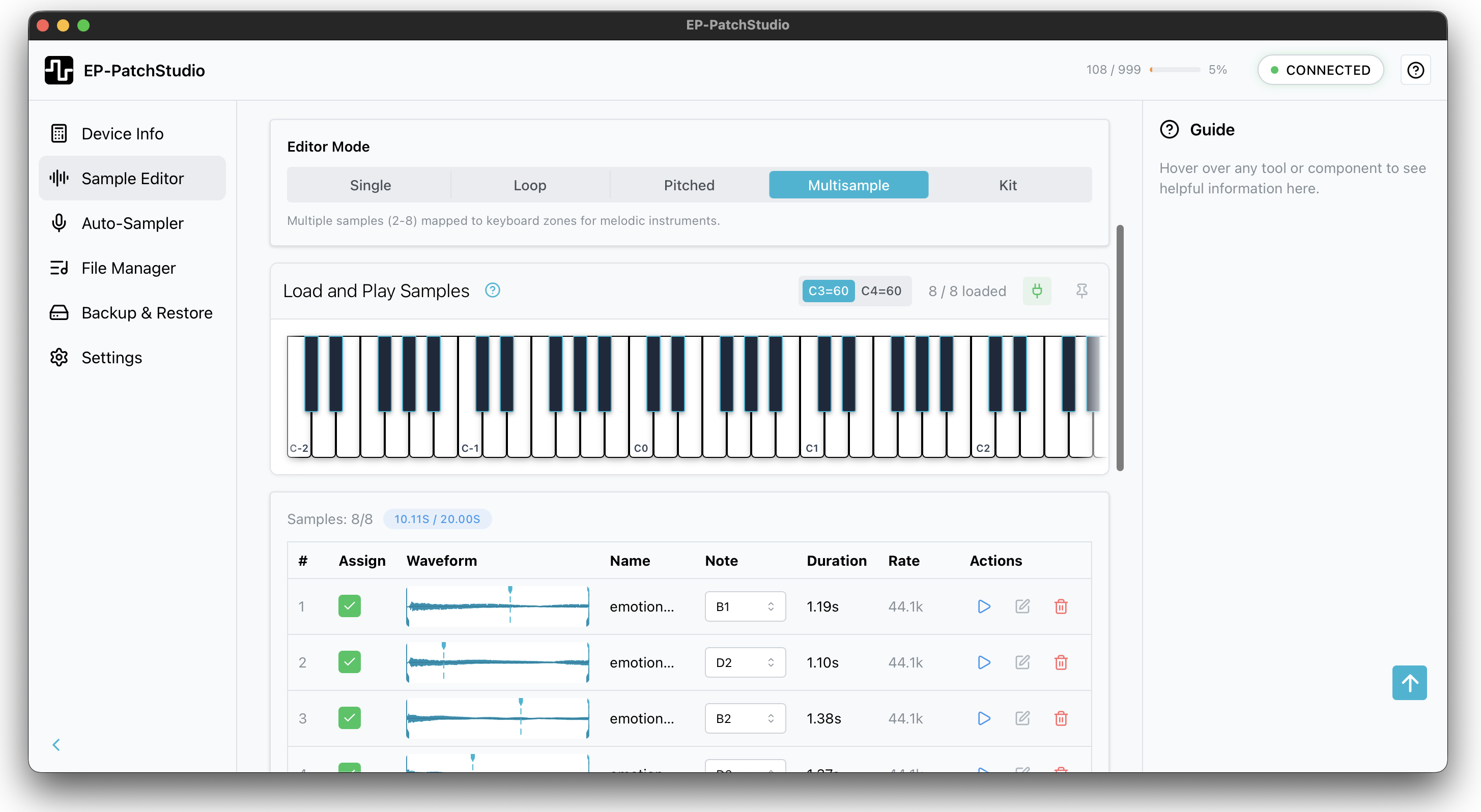
Multisample editor interface showing piano keyboard, sample zones and note mapping

Sound familiar?

Browser-based tools are limiting

Can't work offline. Slow backups. No audio editing. Just basic file transfer. You need more than that.

Multisamples are a nightmare

Three different apps. Manual zone mapping. Hoping the metadata is right. There has to be an easier way.

Sampling synths takes forever

Record a note. Trim. Normalise. Export. Convert. Repeat 8 times. Your afternoon is gone.

The old way vs. the new way

Without EP-PatchStudio

Creating a multisample:

  1. Record each note in your DAW
  2. Export as WAV
  3. Import to an EP multisample editor
  4. Trim silence from each file
  5. Normalise levels
  6. Map zones, edit params
  7. Export samples
  8. Upload to device via TE's EP Sample Tool

Time: 25-30 minutes

Managing your device with TE's EP Sample Tool:

  • Browser-based, can't work offline
  • No multisample editor
  • No audio editing tools
  • Slow backups
With EP-PatchStudio

Creating a multisample:

  1. Drop samples in (zones auto-map from metadata/filenames)
  2. Click "Send to Device"

Done

Time: 2 minutes

Or use the Auto-Sampler:

  1. Connect synth via MIDI
  2. Set note range
  3. Click Record (zones auto-map)
  4. Click "Send to Device"

Done

Time: 5 minutes

Managing your device:

  • Native app, works offline
  • Batch upload/download/delete
  • Fast transfers
  • One-click backup & restore

Here's what it does

All the tools I needed when I started making multisamples

FREEPRO
Multisamples Made Easy
Create multisamples manually (free) or with auto-mapping (Pro).
  • 5 modes: Single, Loop, Pitched, Multi, Kit FREE
  • Up to 8 zones with manual mapping FREE
  • Smart auto-mapping from metadata/filenames PRO
  • Full parameter control: pitch, pan, envelope FREE
  • OP-1 drum kit import FREE
PRO
Device Management That Doesn't Suck
Everything TE's EP Sample Tool does, but native and offline.
  • Browse device file system directly
  • Edit samples directly from device
  • Batch upload/download/delete
  • Storage usage monitoring
  • Shows samples assigned to projects
PRO
Backups You'll Actually Make
One click. Full device backup in 2 minutes. Sleep easy.
  • Full device backup in about 2 minutes
  • Per-project backup & restore
  • Selective restore
  • Backup verification
  • Never lose a project again
FREE
Pro Audio Tools Built In
No need to open your DAW for quick edits.
  • Waveform view
  • Trim, normalise, fade, reverse
  • Time stretch & pitch shift
  • Compressor, gate, limiter, EQ
  • Auto-chop with transient detection
  • Automatic loop point detection
PRO
Auto-Sample Any Synth
Point it at your synth. Walk away. Come back to perfect samples.
  • Sends MIDI notes automatically
  • Records, trims, normalises for you
  • Auto-maps zones in Multisample editor
  • Works with hardware synths & VSTs
  • 5 minutes to a full multisample
FREE
Drag In Anything
WAV, MP3, FLAC, whatever. It just works.
  • Imports WAV, AIFF, FLAC, MP3
  • Auto sample rate conversion
  • Bit depth and sample rate control
  • Mono/stereo export options
One app for everything EP

Full EP-40 Riddim multisample support with complete parameter control, audio editing and device management. I use it for my EP-40 daily.

Playback Modes

Single, Loop, Pitched, Multi, Kit

Max Zones

Full multisample flexibility

Audio Formats

WAV, AIFF, FLAC, MP3

Three steps. That's it.

1
Drag & Drop

Drop your samples in. Or use the Auto-Sampler to record from any synth or VST.

2
Tweak (or don't)

Zones auto-map from metadata/filenames. Adjust attack, release, pitch if you want. Or just leave it.

3
Send to Device

One click. It's on your EP. Go make music.

Average time to create a multisample: 2-5 minutes

Free vs Pro: What's the Difference?

Pro doesn't just give you more features. It gives you more time to make music.

FeatureFreePro
Sample Editing
Waveform view
Trim, normalise, fade, reverse
Time stretch & pitch shift
Compressor, gate, limiter, EQ
Auto-chop & transient detection
Multisample Creation
Create multisamples (manual zones)
All 5 playback modes
Up to 8 zones
Auto zone mapping from metadata and filenames
Device Management
Browse device file system
Upload / download / delete files
Send to device (one click)
Batch operations
Backup & Restore
Full device backup
Per-project backup & restore
Auto-Sampler
MIDI auto-sampler
Record from hardware synths / VSTs
Platform & Support
macOS, Windows, Linux
Lifetime updates
Priority email support
Price
Free
forever
$25-79
pay what you want
Download FreeGet Pro

Download EP-PatchStudio

Free forever. No account required. No strings attached.

macOS
macOS 11.0 or later

Intel & Apple Silicon

Windows
Windows 10 or later

64-bit installer

Linux
Ubuntu 20.04+ or equivalent

.deb & .AppImage

Version 1.0.0 • February 2026

Want the full workflow? Upgrade to Pro →

You decide. $25-79. Once. Forever.

I could have picked a number. Instead, I'm letting you decide what EP-PatchStudio Pro is worth to you.

Students and hobbyists? $25 gets you everything.

Want to support ongoing development? Pay more.

Same features either way. No judgment.

Honest Pricing. You Decide.

Start free. Pro is pay what you want: $25-79.

Free
$0forever

Full sample editor. No limits. No tricks.

  • Sample editing & audio tools
  • Waveform view
  • Trim, normalise, fade, reverse
  • Time stretch & pitch shift
  • Compressor, gate, limiter, EQ
  • Basic multisample creation
  • All audio formats
  • macOS, Windows, Linux
  • Device management
  • Send to device
  • MIDI auto-sampler
  • Backup & restore
Pro
Pay what you want

$25-79 · Suggested: $35 · One-time payment

  • Everything in Free, plus:
  • Device management
  • Send to device (one click)
  • MIDI auto-sampler
  • Backup & restore
  • Auto zone mapping
  • Batch operations
  • Direct device playback
  • Lifetime updates
  • 14-day money-back guarantee

Secure checkout powered by LemonSqueezy & Stripe

Questions?

Is this a subscription?

No. One-time purchase, lifetime updates. You pay once, you own it forever.

Why pay what you want?

I'd rather you use the software than skip it because of price.

Traditional pricing forces everyone into the same box. PWYW lets you pay what feels fair for your situation. Everyone gets identical software—no tiers, no locked features. You own it forever.

The price difference is about supporting development, not unlocking capabilities.

What do I get for paying more?

Everyone gets identical software. Every feature, no limits, owned forever.

The price difference is about supporting development. Here's what the tiers mean:

  • $25 — Full Pro licence. Covers my costs.
  • $35 — What most people pay. Funds future updates.
  • $50 — Early access to beta features.
  • $79 — Priority support, early beta access, roadmap input, optional credits.

Pick what feels fair for your budget.

What's a Superfan?

The $79 tier. You get priority email support, early access to beta features, direct input on the roadmap and your name in the credits if you want it.

It's for people who want closer access and a voice in what gets built next. Everyone gets the same software, but Superfans help shape where it goes.

Does it work with my device?

EP-PatchStudio supports EP-40 Riddim, EP-133 K.O. II and EP-1320 Medieval. Multisample creation and looped samples are EP-40 only (it's the only one that supports the additional modes until TE releases an updated firmware hopefully). Device management works with all three.

What's the difference between this and TE's EP Sample Tool?

TE's EP Sample Tool is browser-based and limited to basic file transfer and backups. EP-PatchStudio is a native app that works offline, with faster one-click backups, a full multisample editor, auto-sampling and pro audio editing tools. It's everything TE's EP Sample Tool does, plus everything it doesn't.

What if I don't like it?

14-day money-back guarantee, no questions asked.

Mac, Windows, Linux?

Yes, yes and yes. One license covers all three platforms.

What if I need help?

Free users can get help via the Discord community. Pro users get email support - I typically respond within 24 hours, often faster. Superfans get priority email support. It's just me, so you're talking to the person who actually built the thing.

Can I export my work?

Yes. You can export multisamples, individual samples, backups - everything. Your work is yours. Nothing is locked into the app.

Is there annoying DRM or copy protection?

Nope. I'm using LemonSqueezy for payments and their license APIs. You'll get a license key via email when you purchase. Enter it once to activate and you're done. It does a quick online check on first activation but after that the app works completely offline.